Browser plugin
Captcha Helper
Local recognition of common static text CAPTCHAs,Completely recognizes common static text CAPTCHAs on the user's device,Does not rely on remote OCR services。
Only some simple CAPTCHAs are supported,Too complicated to work。
GitHub:https://github.com/hongshuo-wang/local-captcha-solver
- Microsoft Edge Add-ons
- Chrome Web Store
- Download the Firefox Version on GitHub
js script
Automatic recognition and filling of AI CAPTCHAs
A browser extension must be installed Tampermonkey or Violentmonkey,Prepare your own AI API key,Currently only supports OpenAI and Google Gemini,Gemini offers a free quota,Recommend using。
See the author's instructions for specific usage
Script Download:https://greasyfork.org/zh-CN/scripts/540822
Script GitHub:https://github.com/ezyshu/UserScript/tree/main/CAPTCHA-automatic-recognition
Universal CAPTCHA Auto-Input (Upgraded Version)
First, install the Tampermonkey plugin:https://ghgxj.lanzoue.com/iWQo6ho4tba ,How to Use:Tampermonkey Installation Tutorial
- Universal CAPTCHA Auto-Input:https://like996.icu:1205/ It can automatically recognize and fill in numeric + English verification codes.,For a detailed introduction, please see the official homepage.,A demo video is available below。
- Limit:Visitors: 2 times per hour,Registered users: 5 times per hour,Generally, 5 times per hour should be sufficient,For more options, you can invite others to register and get recognized,Will grant +1 hour of usage time,No upper limit! Your invitation code will be sent to your email along with your authorization code after you register.。
- Defect:
- 1.Some websites do not automatically detect the language,Manually added rules also identify incorrect CAPTCHAs。
- 2.Some websites automatically detect comments,This way, each page view consumes one usage,This way, 5 times per hour definitely won't be enough,It is also meaningless,Because it's impossible to comment on every article。
- Registration address:https://like996.icu:1205/register.html
- Download link:https://greasyfork.org/zh-CN/scripts/418942
- Instructions for installation and using the authorization code:https://like996.icu:1205/help.html
Some websites do not have automatic detection,Method for manually adding rules
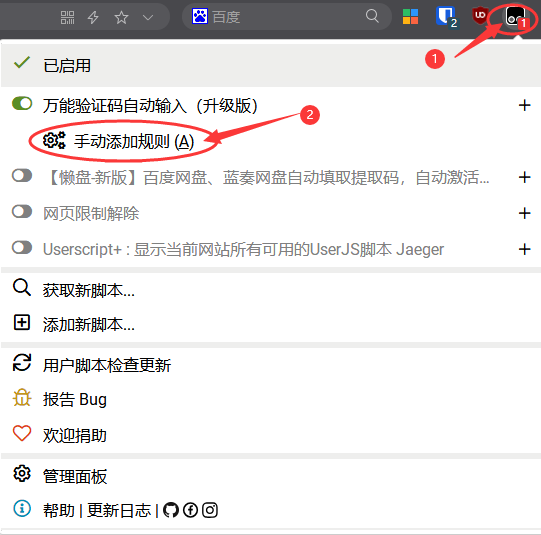
- 3.Right-click the CAPTCHA image
- 4.As prompted, left-click the captcha input box
Automatically recognize and fill in web page CAPTCHAs
- Tampermonkey Script:https://greasyfork.org/zh-CN/scripts/459260
- GitHub:https://github.com/sw1128/Web_Captcha
Browser extension plugin
- Privacy Pass:https://privacypass.github.io You can avoid the hassle of hCaptcha CAPTCHA verification,For a detailed introduction, see Privacy Pass – by Cloudflare、Provided by hCaptcha,Reduce the need for “I am human” verification when visiting web pages[Chrome/Firefox] – Niche software
- Download link:https://chrome.google.com/webstore/detail/privacy-pass/ajhmfdgkijocedmfjonnpjfojldioehi
- Domestic Downloads:http://www.crx4.com/22251.html
- Buster:https://github.com/dessant/buster Helper for passing reCAPTCHA verification,More information:http://www.elecfans.com/d/1381152.html ,It seems to be invalid now,Waiting for the author to update